Instalación
Antes de proceder coa instalación de Apache Server, débese actualizar o repositorio:
$ sudo apt-get update
Saída do comando
$ sudo apt-get update
Obj:1 http://es.archive.ubuntu.com/ubuntu groovy InRelease
Obj:2 http://security.ubuntu.com/ubuntu groovy-security InRelease
Obj:3 http://es.archive.ubuntu.com/ubuntu groovy-updates InRelease
Obj:4 http://es.archive.ubuntu.com/ubuntu groovy-backports InRelease
Leyendo lista de paquetes... Hecho
Instalar Apache Server:
$ sudo apt-get install apache2
Saída do comando
$ sudo apt-get install apache2
Leyendo lista de paquetes... Hecho
Creando árbol de dependencias
Leyendo la información de estado... Hecho
Se instalarán los siguientes paquetes adicionales:
  apache2-bin apache2-data apache2-utils libapr1 libaprutil1 libaprutil1-dbd-sqlite3 libaprutil1-ldap liblua5.2-0
Paquetes sugeridos:
  apache2-doc apache2-suexec-pristine | apache2-suexec-custom
Se instalarán los siguientes paquetes NUEVOS:
  apache2 apache2-bin apache2-data apache2-utils libapr1 libaprutil1 libaprutil1-dbd-sqlite3 libaprutil1-ldap liblua5.2-0
0 actualizados, 9 nuevos se instalarán, 0 para eliminar y 0 no actualizados.
Se necesita descargar 1.843 kB de archivos.
Se utilizarán 8.012 kB de espacio de disco adicional después de esta operación.
¿Desea continuar? [S/n] s
Des:1 http://es.archive.ubuntu.com/ubuntu groovy/main amd64 libapr1 amd64 1.6.5-1ubuntu1 [91,4 kB]
Des:2 http://es.archive.ubuntu.com/ubuntu groovy/main amd64 libaprutil1 amd64 1.6.1-4ubuntu2 [84,7 kB]
Des:3 http://es.archive.ubuntu.com/ubuntu groovy/main amd64 libaprutil1-dbd-sqlite3 amd64 1.6.1-4ubuntu2 [10,5 kB]
Des:4 http://es.archive.ubuntu.com/ubuntu groovy/main amd64 libaprutil1-ldap amd64 1.6.1-4ubuntu2 [8.736 B]
Des:5 http://es.archive.ubuntu.com/ubuntu groovy/main amd64 liblua5.2-0 amd64 5.2.4-1.1build3 [106 kB]
Des:6 http://es.archive.ubuntu.com/ubuntu groovy/main amd64 apache2-bin amd64 2.4.46-1ubuntu1 [1.204 kB]
Des:7 http://es.archive.ubuntu.com/ubuntu groovy/main amd64 apache2-data all 2.4.46-1ubuntu1 [158 kB]
Des:8 http://es.archive.ubuntu.com/ubuntu groovy/main amd64 apache2-utils amd64 2.4.46-1ubuntu1 [83,6 kB]
Des:9 http://es.archive.ubuntu.com/ubuntu groovy/main amd64 apache2 amd64 2.4.46-1ubuntu1 [95,6 kB]
Descargados 1.843 kB en 9s (215 kB/s)
Seleccionando el paquete libapr1:amd64 previamente no seleccionado.
(Leyendo la base de datos ... 151971 ficheros o directorios instalados actualmente.)
Preparando para desempaquetar .../0-libapr1_1.6.5-1ubuntu1_amd64.deb ...
Desempaquetando libapr1:amd64 (1.6.5-1ubuntu1) ...
Seleccionando el paquete libaprutil1:amd64 previamente no seleccionado.
Preparando para desempaquetar .../1-libaprutil1_1.6.1-4ubuntu2_amd64.deb ...
Desempaquetando libaprutil1:amd64 (1.6.1-4ubuntu2) ...
Seleccionando el paquete libaprutil1-dbd-sqlite3:amd64 previamente no seleccionado.
Preparando para desempaquetar .../2-libaprutil1-dbd-sqlite3_1.6.1-4ubuntu2_amd64.deb ...
Desempaquetando libaprutil1-dbd-sqlite3:amd64 (1.6.1-4ubuntu2) ...
Seleccionando el paquete libaprutil1-ldap:amd64 previamente no seleccionado.
Preparando para desempaquetar .../3-libaprutil1-ldap_1.6.1-4ubuntu2_amd64.deb ...
Desempaquetando libaprutil1-ldap:amd64 (1.6.1-4ubuntu2) ...
Seleccionando el paquete liblua5.2-0:amd64 previamente no seleccionado.
Preparando para desempaquetar .../4-liblua5.2-0_5.2.4-1.1build3_amd64.deb ...
Desempaquetando liblua5.2-0:amd64 (5.2.4-1.1build3) ...
Seleccionando el paquete apache2-bin previamente no seleccionado.
Preparando para desempaquetar .../5-apache2-bin_2.4.46-1ubuntu1_amd64.deb ...
Desempaquetando apache2-bin (2.4.46-1ubuntu1) ...
Seleccionando el paquete apache2-data previamente no seleccionado.
Preparando para desempaquetar .../6-apache2-data_2.4.46-1ubuntu1_all.deb ...
Desempaquetando apache2-data (2.4.46-1ubuntu1) ...
Seleccionando el paquete apache2-utils previamente no seleccionado.
Preparando para desempaquetar .../7-apache2-utils_2.4.46-1ubuntu1_amd64.deb ...
Desempaquetando apache2-utils (2.4.46-1ubuntu1) ...
Seleccionando el paquete apache2 previamente no seleccionado.
Preparando para desempaquetar .../8-apache2_2.4.46-1ubuntu1_amd64.deb ...
Desempaquetando apache2 (2.4.46-1ubuntu1) ...
Configurando libapr1:amd64 (1.6.5-1ubuntu1) ...
Configurando liblua5.2-0:amd64 (5.2.4-1.1build3) ...
Configurando apache2-data (2.4.46-1ubuntu1) ...
Configurando libaprutil1:amd64 (1.6.1-4ubuntu2) ...
Configurando libaprutil1-ldap:amd64 (1.6.1-4ubuntu2) ...
Configurando libaprutil1-dbd-sqlite3:amd64 (1.6.1-4ubuntu2) ...
Configurando apache2-utils (2.4.46-1ubuntu1) ...
Configurando apache2-bin (2.4.46-1ubuntu1) ...
Configurando apache2 (2.4.46-1ubuntu1) ...
Enabling module mpm_event.
Enabling module authz_core.
Enabling module authz_host.
Enabling module authn_core.
Enabling module auth_basic.
Enabling module access_compat.
Enabling module authn_file.
Enabling module authz_user.
Enabling module alias.
Enabling module dir.
Enabling module autoindex.
Enabling module env.
Enabling module mime.
Enabling module negotiation.
Enabling module setenvif.
Enabling module filter.
Enabling module deflate.
Enabling module status.
Enabling module reqtimeout.
Enabling conf charset.
Enabling conf localized-error-pages.
Enabling conf other-vhosts-access-log.
Enabling conf security.
Enabling conf serve-cgi-bin.
Enabling site 000-default.
Created symlink /etc/systemd/system/multi-user.target.wants/apache2.service → /lib/systemd/system/apache2.service.
Created symlink /etc/systemd/system/multi-user.target.wants/apache-htcacheclean.service → /lib/systemd/system/apache-htcacheclean.service.
Procesando disparadores para ufw (0.36-7) ...
Procesando disparadores para systemd (246.6-1ubuntu1) ...
Procesando disparadores para man-db (2.9.3-2) ...
Procesando disparadores para libc-bin (2.32-0ubuntu3) ...
Para comprobar que Apache se instalou correctamente, podemos executar o seguinte comando:
$ apache2 -v
Saída do comando
$ apache2 -v
Server version: Apache/2.4.46 (Ubuntu)
Server built:   2020-08-25T12:13:38
O comando anterior mostrará a versión de Apache Server se a instalación foi correcta.
Supoñendo que o dominio do servidor é localhost, podemos comprobar que o servidor web se está executando correctamente se abrimos un navegador web e accedemos a http://localhost ou a http://127.0.0.1.
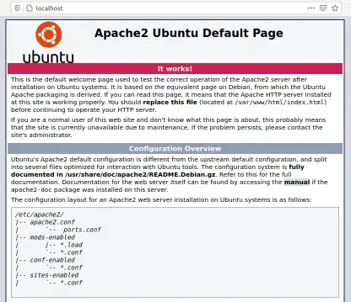
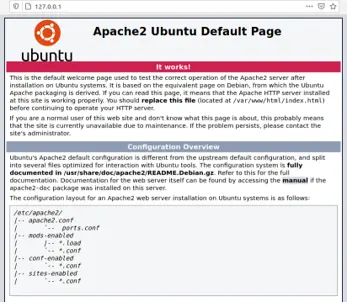
localhost
O nome localhost só o empregaremos cando intentemos acceder a unha páxina web que está no propio equipo, é dicir, utilizaremos localhost se temos o navegador e o Apache no mesmo equipo.