PHP

PHP (PHP: Hypertext Preprocessor) é unha linguaxe de programación de uso xeral especialmente indicado para o desenvolvemento web. O código PHP normalmente é procesado nun servidor web por un intérprete de PHP implementado nalgunha das seguintes formas:
- Módulo
- Servizo
- Executable de CGI
Instalación
Antes da instalación, débese actualizar o repositorio:
$ sudo apt-get update
Saída do comando
$ sudo apt-get update
Obj:1 http://es.archive.ubuntu.com/ubuntu groovy InRelease
Des:2 http://es.archive.ubuntu.com/ubuntu groovy-updates InRelease [106 kB]
Obj:3 http://es.archive.ubuntu.com/ubuntu groovy-backports InRelease
Des:4 http://security.ubuntu.com/ubuntu groovy-security InRelease [108 kB]
Des:5 http://es.archive.ubuntu.com/ubuntu groovy-updates/main i386 Packages [16,3 kB]
Des:6 http://es.archive.ubuntu.com/ubuntu groovy-updates/main amd64 Packages [58,9 kB]
Des:7 http://es.archive.ubuntu.com/ubuntu groovy-updates/main Translation-en [13,9 kB]
Des:8 http://es.archive.ubuntu.com/ubuntu groovy-updates/main amd64 DEP-11 Metadata [2.584 B]
Des:9 http://es.archive.ubuntu.com/ubuntu groovy-updates/main amd64 c-n-f Metadata [876 B]
Des:10 http://es.archive.ubuntu.com/ubuntu groovy-updates/restricted i386 Packages [2.576 B]
Des:11 http://es.archive.ubuntu.com/ubuntu groovy-updates/restricted amd64 Packages [29,5 kB]
Des:12 http://es.archive.ubuntu.com/ubuntu groovy-updates/restricted Translation-en [5.636 B]
Des:13 http://es.archive.ubuntu.com/ubuntu groovy-updates/restricted amd64 c-n-f Metadata [292 B]
Des:14 http://es.archive.ubuntu.com/ubuntu groovy-updates/universe i386 Packages [11,1 kB]
Des:15 http://es.archive.ubuntu.com/ubuntu groovy-updates/universe amd64 Packages [12,2 kB]
Des:16 http://es.archive.ubuntu.com/ubuntu groovy-updates/universe Translation-en [4.064 B]
Des:17 http://es.archive.ubuntu.com/ubuntu groovy-updates/universe amd64 DEP-11 Metadata [1.808 B]
Des:18 http://es.archive.ubuntu.com/ubuntu groovy-updates/universe DEP-11 48x48 Icons [5.648 B]
Des:19 http://es.archive.ubuntu.com/ubuntu groovy-updates/universe amd64 c-n-f Metadata [688 B]
Des:20 http://security.ubuntu.com/ubuntu groovy-security/main i386 Packages [13,4 kB]
Des:21 http://security.ubuntu.com/ubuntu groovy-security/main amd64 Packages [31,9 kB]
Des:22 http://security.ubuntu.com/ubuntu groovy-security/main Translation-en [7.344 B]
Des:23 http://security.ubuntu.com/ubuntu groovy-security/main amd64 DEP-11 Metadata [2.580 B]
Des:24 http://security.ubuntu.com/ubuntu groovy-security/main amd64 c-n-f Metadata [716 B]
Des:25 http://security.ubuntu.com/ubuntu groovy-security/universe amd64 Packages [12,2 kB]
Des:26 http://security.ubuntu.com/ubuntu groovy-security/universe i386 Packages [11,1 kB]
Des:27 http://security.ubuntu.com/ubuntu groovy-security/universe Translation-en [4.064 B]
Des:28 http://security.ubuntu.com/ubuntu groovy-security/universe amd64 DEP-11 Metadata [1.804 B]
Des:29 http://security.ubuntu.com/ubuntu groovy-security/universe DEP-11 48x48 Icons [5.648 B]
Des:30 http://security.ubuntu.com/ubuntu groovy-security/universe amd64 c-n-f Metadata [688 B]
Descargados 472 kB en 2s (194 kB/s)
Leyendo lista de paquetes... Hecho
Instalamos PHP:
$ sudo apt-get install php
Saída do comando
$ sudo apt-get install php
Leyendo lista de paquetes... Hecho
Creando árbol de dependencias
Leyendo la información de estado... Hecho
Se instalarán los siguientes paquetes adicionales:
  libapache2-mod-php7.4 php-common php7.4 php7.4-cli php7.4-common php7.4-json php7.4-opcache php7.4-readline
Paquetes sugeridos:
  php-pear
Se instalarán los siguientes paquetes NUEVOS:
  libapache2-mod-php7.4 php php-common php7.4 php7.4-cli php7.4-common php7.4-json php7.4-opcache php7.4-readline
0 actualizados, 9 nuevos se instalarán, 0 para eliminar y 6 no actualizados.
Se necesita descargar 4.030 kB de archivos.
Se utilizarán 18,0 MB de espacio de disco adicional después de esta operación.
¿Desea continuar? [S/n] s
Des:1 http://es.archive.ubuntu.com/ubuntu groovy/main amd64 php-common all 2:76 [12,0 kB]
Des:2 http://es.archive.ubuntu.com/ubuntu groovy-updates/main amd64 php7.4-common amd64 7.4.9-1ubuntu1.1 [982 kB]
Des:3 http://es.archive.ubuntu.com/ubuntu groovy-updates/main amd64 php7.4-json amd64 7.4.9-1ubuntu1.1 [19,4 kB]
Des:4 http://es.archive.ubuntu.com/ubuntu groovy-updates/main amd64 php7.4-opcache amd64 7.4.9-1ubuntu1.1 [198 kB]
Des:5 http://es.archive.ubuntu.com/ubuntu groovy-updates/main amd64 php7.4-readline amd64 7.4.9-1ubuntu1.1 [12,5 kB]
Des:6 http://es.archive.ubuntu.com/ubuntu groovy-updates/main amd64 php7.4-cli amd64 7.4.9-1ubuntu1.1 [1.425 kB]
Des:7 http://es.archive.ubuntu.com/ubuntu groovy-updates/main amd64 libapache2-mod-php7.4 amd64 7.4.9-1ubuntu1.1 [1.369 kB]
Des:8 http://es.archive.ubuntu.com/ubuntu groovy-updates/main amd64 php7.4 all 7.4.9-1ubuntu1.1 [9.244 B]
Des:9 http://es.archive.ubuntu.com/ubuntu groovy/main amd64 php all 2:7.4+76 [2.772 B]
Descargados 4.030 kB en 14s (281 kB/s)
Seleccionando el paquete php-common previamente no seleccionado.
(Leyendo la base de datos ... 152686 ficheros o directorios instalados actualmente.)
Preparando para desempaquetar .../0-php-common_2%3a76_all.deb ...
Desempaquetando php-common (2:76) ...
Seleccionando el paquete php7.4-common previamente no seleccionado.
Preparando para desempaquetar .../1-php7.4-common_7.4.9-1ubuntu1.1_amd64.deb ...
Desempaquetando php7.4-common (7.4.9-1ubuntu1.1) ...
Seleccionando el paquete php7.4-json previamente no seleccionado.
Preparando para desempaquetar .../2-php7.4-json_7.4.9-1ubuntu1.1_amd64.deb ...
Desempaquetando php7.4-json (7.4.9-1ubuntu1.1) ...
Seleccionando el paquete php7.4-opcache previamente no seleccionado.
Preparando para desempaquetar .../3-php7.4-opcache_7.4.9-1ubuntu1.1_amd64.deb ...
Desempaquetando php7.4-opcache (7.4.9-1ubuntu1.1) ...
Seleccionando el paquete php7.4-readline previamente no seleccionado.
Preparando para desempaquetar .../4-php7.4-readline_7.4.9-1ubuntu1.1_amd64.deb ...
Desempaquetando php7.4-readline (7.4.9-1ubuntu1.1) ...
Seleccionando el paquete php7.4-cli previamente no seleccionado.
Preparando para desempaquetar .../5-php7.4-cli_7.4.9-1ubuntu1.1_amd64.deb ...
Desempaquetando php7.4-cli (7.4.9-1ubuntu1.1) ...
Seleccionando el paquete libapache2-mod-php7.4 previamente no seleccionado.
Preparando para desempaquetar .../6-libapache2-mod-php7.4_7.4.9-1ubuntu1.1_amd64.deb ...
Desempaquetando libapache2-mod-php7.4 (7.4.9-1ubuntu1.1) ...
Seleccionando el paquete php7.4 previamente no seleccionado.
Preparando para desempaquetar .../7-php7.4_7.4.9-1ubuntu1.1_all.deb ...
Desempaquetando php7.4 (7.4.9-1ubuntu1.1) ...
Seleccionando el paquete php previamente no seleccionado.
Preparando para desempaquetar .../8-php_2%3a7.4+76_all.deb ...
Desempaquetando php (2:7.4+76) ...
Configurando php-common (2:76) ...
Created symlink /etc/systemd/system/timers.target.wants/phpsessionclean.timer → /lib/systemd/system/phpsessionclean.timer.
Configurando php7.4-common (7.4.9-1ubuntu1.1) ...

Creating config file /etc/php/7.4/mods-available/calendar.ini with new version

Creating config file /etc/php/7.4/mods-available/ctype.ini with new version

Creating config file /etc/php/7.4/mods-available/exif.ini with new version

Creating config file /etc/php/7.4/mods-available/fileinfo.ini with new version

Creating config file /etc/php/7.4/mods-available/ffi.ini with new version

Creating config file /etc/php/7.4/mods-available/ftp.ini with new version

Creating config file /etc/php/7.4/mods-available/gettext.ini with new version

Creating config file /etc/php/7.4/mods-available/iconv.ini with new version

Creating config file /etc/php/7.4/mods-available/pdo.ini with new version

Creating config file /etc/php/7.4/mods-available/phar.ini with new version

Creating config file /etc/php/7.4/mods-available/posix.ini with new version

Creating config file /etc/php/7.4/mods-available/shmop.ini with new version

Creating config file /etc/php/7.4/mods-available/sockets.ini with new version

Creating config file /etc/php/7.4/mods-available/sysvmsg.ini with new version

Creating config file /etc/php/7.4/mods-available/sysvsem.ini with new version

Creating config file /etc/php/7.4/mods-available/sysvshm.ini with new version

Creating config file /etc/php/7.4/mods-available/tokenizer.ini with new version
Configurando php7.4-readline (7.4.9-1ubuntu1.1) ...

Creating config file /etc/php/7.4/mods-available/readline.ini with new version
Configurando php7.4-opcache (7.4.9-1ubuntu1.1) ...

Creating config file /etc/php/7.4/mods-available/opcache.ini with new version
Configurando php7.4-json (7.4.9-1ubuntu1.1) ...

Creating config file /etc/php/7.4/mods-available/json.ini with new version
Configurando php7.4-cli (7.4.9-1ubuntu1.1) ...
update-alternatives: utilizando /usr/bin/php7.4 para proveer /usr/bin/php (php) en modo automático
update-alternatives: utilizando /usr/bin/phar7.4 para proveer /usr/bin/phar (phar) en modo automático
update-alternatives: utilizando /usr/bin/phar.phar7.4 para proveer /usr/bin/phar.phar (phar.phar) en modo automático

Creating config file /etc/php/7.4/cli/php.ini with new version
Configurando libapache2-mod-php7.4 (7.4.9-1ubuntu1.1) ...

Creating config file /etc/php/7.4/apache2/php.ini with new version
Module mpm_event disabled.
Enabling module mpm_prefork.
apache2_switch_mpm Switch to prefork
apache2_invoke: Enable module php7.4
Configurando php7.4 (7.4.9-1ubuntu1.1) ...
Configurando php (2:7.4+76) ...
Procesando disparadores para man-db (2.9.3-2) ...
Procesando disparadores para php7.4-cli (7.4.9-1ubuntu1.1) ...
Procesando disparadores para libapache2-mod-php7.4 (7.4.9-1ubuntu1.1) ...
Coa instalación de PHP, tamén se instala un módulo de Apache para dar soporte a PHP. Isto podemos comprobalo vendo a saída que producíu o comando anterior. Hai unhas liñas que poñen o seguinte:
Se instalarán los siguientes paquetes adicionales:
  libapache2-mod-php7.4 php-common php7.4 php7.4-cli php7.4-common php7.4-json php7.4-opcache php7.4-readline
Estas liñas mostran os paquetes que se instalan paquetes a maiores de php. O primeiro paquete da lista chámase libapache2-mod-php7.4, o cal é o módulo de Apache Server.
Despois da instalación, o módulo actívase automáticamente. Podemos comprobalo co seguinte comando:
$ apache2 -M
Saída do comando
$ apache2 -M
AH00558: apache2: Could not reliably determine the server's fully qualified domain name, using 127.0.1.1. Set the 'ServerName' directive globally to suppress this message
Loaded Modules:
 core_module (static)
 so_module (static)
 watchdog_module (static)
 http_module (static)
 log_config_module (static)
 logio_module (static)
 version_module (static)
 unixd_module (static)
 access_compat_module (shared)
 alias_module (shared)
 auth_basic_module (shared)
 authn_core_module (shared)
 authn_file_module (shared)
 authz_core_module (shared)
 authz_host_module (shared)
 authz_user_module (shared)
 autoindex_module (shared)
 deflate_module (shared)
 dir_module (shared)
 env_module (shared)
 filter_module (shared)
 mime_module (shared)
 mpm_prefork_module (shared)
 negotiation_module (shared)
 php7_module (shared)
 reqtimeout_module (shared)
 setenvif_module (shared)
 status_module (shared)
Se o comando apache2 -M non che mostra os módulos, executa o seguinte:
$ source /etc/apache2/envvars
O comando apache2 -M móstranos unha lista de todos os módulos activos en Apache Server.
No caso de non estar o módulo activado, podemos activalo da seguinte maneira:
$ sudo a2enmod php7.4
Para comprobar que PHP está correctamente instalado e funcionando, podemos crear un ficheiro PHP:
$ sudo touch /var/www/html/index.php
Editamos o ficheiro:
$ sudo nano /var/www/html/index.php
Engadimos as seguintes liñas:
<?php
phpinfo();
Gardamos os cambios e comprobamos que no mesmo directo non exista un index.html. Se é así, temos que modificar o seu nome ou eliminalo. Cando nun mesmo directorio hai un index.php e un index.html, antes vaise a mostrar o contido do ficheiro HTML.
Executamos o seguinte comando se queremos cambiarlle o nome:
$ sudo mv /var/www/html/index.html /var/www/html/index.html.bak
Se accedemos á web a través dun navegador, deberíase mostrar algo similar ao seguinte:
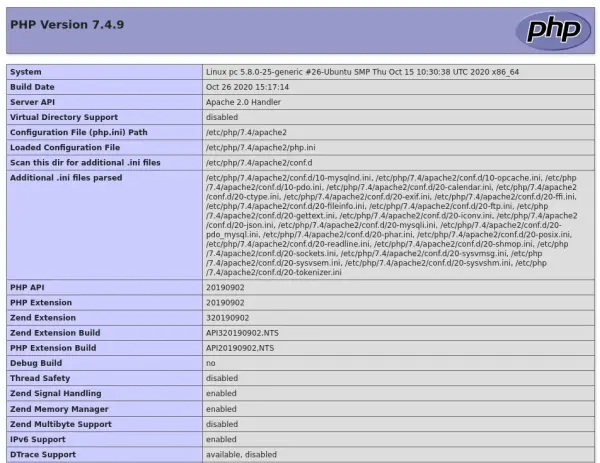
PHP para HTTP/2
Cando executamos Apache xunto co módulo php7.4 e temos pensado empregar a segunda versión do protocolo HTTP, debemos cambiar a PHP-FPM (FastCGI Process Manager). Isto ocorre porque o módulo php7.4 usa o módulo mpm_prefork, un módulo que non é compatible con HTTP/2.
Polo tanto, se realizamos os pasos do apartado de Instalación, temos que desfacer os cambios. En primeiro lugar, deshabilitamos o módulo php7.4:
$ sudo a2dismod php7.4
Saída do comando
$ sudo a2dismod php7.4
Module php7.4 disabled.
To activate the new configuration, you need to run:
  systemctl restart apache2
Tamén temos que deshabilitar o módulo mpm_prefork:
$ sudo a2dismod mpm_prefork
Saída do comando
$ sudo a2dismod mpm_prefork
Module mpm_prefork disabled.
To activate the new configuration, you need to run:
  systemctl restart apache2
Habilitamos os módulos mpm_event, proxy_fcgi e setenvif:
$ sudo a2enmod mpm_event proxy_fcgi setenvif
Saída do comando
$ sudo a2enmod mpm_event proxy_fcgi setenvif
Considering conflict mpm_worker for mpm_event:
Considering conflict mpm_prefork for mpm_event:
Enabling module mpm_event.
Considering dependency proxy for proxy_fcgi:
Enabling module proxy.
Enabling module proxy_fcgi.
Module setenvif already enabled
To activate the new configuration, you need to run:
  systemctl restart apache2
Instalamos php7.4-fpm:
$ sudo apt install php7.4-fpm
Saída do comando
$ sudo apt install php7.4-fpm
Leyendo lista de paquetes... Hecho
Creando árbol de dependencias
Leyendo la información de estado... Hecho
Paquetes sugeridos:
  php-pear
Se instalarán los siguientes paquetes NUEVOS:
  php7.4-fpm
0 actualizados, 1 nuevos se instalarán, 0 para eliminar y 3 no actualizados.
Se necesita descargar 1.436 kB de archivos.
Se utilizarán 4.883 kB de espacio de disco adicional después de esta operación.
Des:1 http://es.archive.ubuntu.com/ubuntu groovy-updates/universe amd64 php7.4-fpm amd64 7.4.9-1ubuntu1.1 [1.436 kB]
Descargados 1.436 kB en 3s (510 kB/s)
Seleccionando el paquete php7.4-fpm previamente no seleccionado.
(Leyendo la base de datos ... 154109 ficheros o directorios instalados actualmente.)
Preparando para desempaquetar .../php7.4-fpm_7.4.9-1ubuntu1.1_amd64.deb ...
Desempaquetando php7.4-fpm (7.4.9-1ubuntu1.1) ...
Configurando php7.4-fpm (7.4.9-1ubuntu1.1) ...

Creating config file /etc/php/7.4/fpm/php.ini with new version
NOTICE: Not enabling PHP 7.4 FPM by default.
NOTICE: To enable PHP 7.4 FPM in Apache2 do:
NOTICE: a2enmod proxy_fcgi setenvif
NOTICE: a2enconf php7.4-fpm
NOTICE: You are seeing this message because you have apache2 package installed.
Created symlink /etc/systemd/system/multi-user.target.wants/php7.4-fpm.service → /lib/systemd/system/php7.4-fpm.service.
Procesando disparadores para man-db (2.9.3-2) ...
Procesando disparadores para systemd (246.6-1ubuntu1) ...
Procesando disparadores para php7.4-fpm (7.4.9-1ubuntu1.1) ...
NOTICE: Not enabling PHP 7.4 FPM by default.
NOTICE: To enable PHP 7.4 FPM in Apache2 do:
NOTICE: a2enmod proxy_fcgi setenvif
NOTICE: a2enconf php7.4-fpm
NOTICE: You are seeing this message because you have apache2 package installed.
Podemos consultar o estado do servizo php7.4-fpm:
$ systemctl status php7.4-fpm
Saída do comando
$ systemctl status php7.4-fpm
● php7.4-fpm.service - The PHP 7.4 FastCGI Process Manager
     Loaded: loaded (/lib/systemd/system/php7.4-fpm.service; enabled; vendor preset: enabled)
     Active: active (running) since Sat 2020-10-31 19:23:01 CET; 14s ago
       Docs: man:php-fpm7.4(8)
    Process: 13013 ExecStartPost=/usr/lib/php/php-fpm-socket-helper install /run/php/php-fpm.sock /etc/php/7.4/fpm/pool.d/www.conf 74 (code=exited, status=0/SUCCESS)
   Main PID: 13010 (php-fpm7.4)
     Status: "Processes active: 0, idle: 2, Requests: 0, slow: 0, Traffic: 0req/sec"
      Tasks: 3 (limit: 4615)
     Memory: 7.5M
     CGroup: /system.slice/php7.4-fpm.service
             ├─13010 php-fpm: master process (/etc/php/7.4/fpm/php-fpm.conf)
             ├─13011 php-fpm: pool www
             └─13012 php-fpm: pool www

oct 31 19:23:01 pc systemd[1]: Starting The PHP 7.4 FastCGI Process Manager...
oct 31 19:23:01 pc systemd[1]: Started The PHP 7.4 FastCGI Process Manager.
Activamos a configuración do novo CGI:
$ sudo a2enconf php7.4-fpm
Saída do comando
$ sudo a2enconf php7.4-fpm
Enabling conf php7.4-fpm.
To activate the new configuration, you need to run:
  systemctl reload apache2
Reiniciamos o servidor para aplicar todos os cambios:
$ sudo systemctl restart apache2
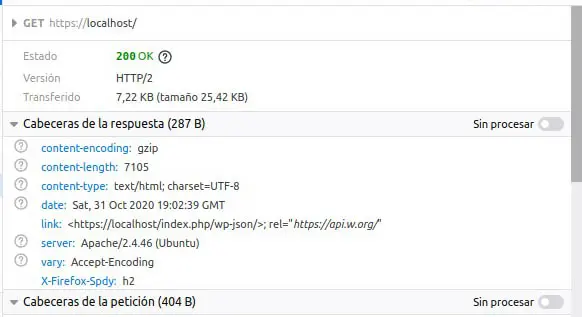
Se abrimos o navegador e accedemos a https://localhost, podemos ver que se está empregando HTTP/2.